Girato
Screen recorder · Windows, Mac, browser

Screen recordings that look expensive. Without the editing.

Record the way you always do. Girato zooms into every click, smooths your cursor and frames it in 3D on a backdrop, by itself. The edit is done when you press stop.

  • No account
  • No card
  • Nothing uploaded
  • 2 badge-free exports
Filmed in the real app
0uploads: it all runs on your computer
3platforms: Windows, Mac and the browser
26backdrops and 4 aspect ratios
$0to start. No account, no card
The short list

Five reasons people switch to Girato

Each one is shown in the real app. No mock-ups.

01

It zooms into every click for you

  • Most demos get their zooms by hand, keyframe by keyframe.
  • Girato reads your clicks while you record.
  • It aims the camera at each one, then glides back out.
  • You never open a keyframe.
Check it: record 20 seconds free. The zooms are in before you touch anything.
02

It looks like a studio made it

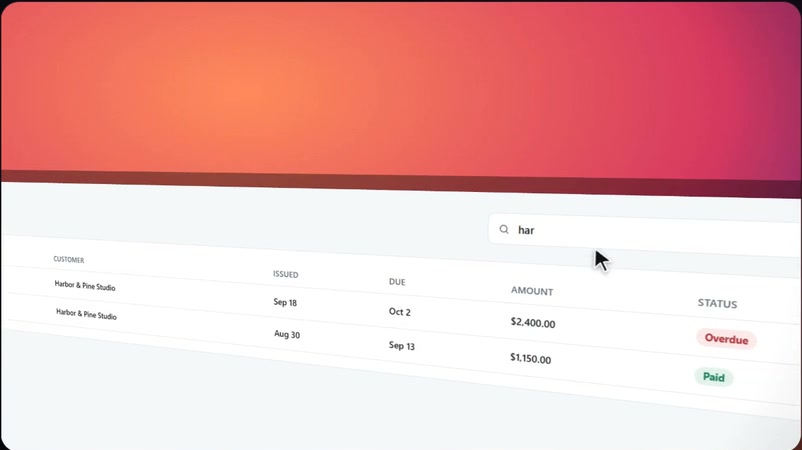
  • A gentle 3D lean, a soft shadow and rounded corners.
  • One of 26 backdrops behind it.
  • A flat screen grab ends up looking designed.
  • One click changes the whole look.
Check it: 26 named backdrops and 4 aspect ratios, all in the free plan.
03

Nothing you record leaves your computer

  • No upload step, and no server storing your recordings.
  • Captions are written on your machine too.
  • Blur emails, API keys and customer names before anyone sees them.
Check it: turn Wi-Fi off in the desktop app. It all keeps working.
04

One recording, every format

  • 16:9 for YouTube, 9:16 for Reels.
  • Square posts and 4:5 feed videos too.
  • All from the same take, without recording again.
  • On Windows, on a Mac or in the browser.
Check it: MP4 (H.264 + AAC) that X, LinkedIn and Instagram accept as-is, plus GIF.
05

Pay once, or never

  • The full editor is free for good, with a small badge.
  • Pro removes the badge and adds 4K.
  • Or pay $99 once and never see a renewal email.
Money-back: 14 days on your first Pro purchase, on top of your statutory rights.
$0free for good
$8a month for Pro, paid yearly
$99once, for life
Position

Heard these about other recorders?

What users and the makers' own pages say, linked to the source, and what Girato does instead.

Screen StudioTheir own page
  • Mac only.
  • No near-future plans for Windows.
Source: screen.studio pricing and FAQ, checked 22 Oct 2026
Girato has the same auto-zoom style on Windows, Mac and the browser.
Screen StudioTheir own page
  • Subscription only: $29 a month, or $9 a month billed yearly.
  • The one-time license is gone.
Source: screen.studio pricing, checked 22 Oct 2026
Girato Lifetime is $99 once. No renewals.
LoomTheir own page
  • Free plan recordings stop at 5 minutes.
  • It also caps you at 25 videos and 720p.
Source: loom.com/pricing, checked 22 Oct 2026
Girato free exports real 1080p60 MP4, with a small badge and no time limit.
LoomTheir own page
  • Prices went up for existing customers from 30 November 2025.
  • There was no opt-out.
Source: Atlassian support, checked 22 Oct 2026
Pay $99 once and your price can never go up.
CamtasiaTheir own page
  • Subscription only since February 2025.
  • Let it lapse and your exports carry a watermark.
Source: TechSmith support, checked 22 Oct 2026
Girato Lifetime is yours for good, updates included.
DescriptUsers say
  • AI credits run out fast.
  • Cancelling is hard (Trustpilot 2.6 out of 5).
Source: Trustpilot, checked 22 Oct 2026
Girato writes captions on your computer. No credits, no per-minute fees.
TellaTheir own page
  • No free plan.
  • Downloading your raw recordings needs a paid plan.
Source: tella.com pricing and help, checked 22 Oct 2026
Your Girato recordings never leave your computer. They are already yours.
OBS StudioTheir own page
  • Zoom-and-follow needs a third-party plugin.
  • That plugin is tested only on Windows 11.
Source: OBS forum, Zoominator plugin, checked 22 Oct 2026
Auto-zoom is built in. Nothing to install or set up.

Swipe for more

Fair is fair: Loom's instant share links, OBS being free and open source, and Screen Studio's polish are real strengths. Girato is for polished videos you own, made on your own computer.

Package

Everything you get, in one app

No add-ons and no credits. The free plan has all of this, at 1080p with a small badge.

Auto-zoom cameraZooms into every click and follows your cursor
Smooth cursor and click effectsSpotlights, click sounds, typing sounds
3D tilt and 26 backdropsCinematic framing without a design tool
Every shape from one take16:9, 9:16, 1:1 and 4:5
Local auto-captionsPlus .srt and .vtt files, made on your computer
System sound and microphoneEach on its own track, with mic clean-up
Webcam bubbleWith background blur or removal
Blur boxesHide emails, keys and customer data
Titles and step labelsFive entrances, drag them anywhere
Cut by deleting wordsEdit the transcript, the video follows
A real timelineSplit, delete, speed up, drag and snap
MP4 and GIF export1080p60 free, up to 4K on Pro

Free

$0
Free for good
  • The full editor
  • 1080p at 60fps
  • 3 clean exports a month
  • Then a small "Made with Girato" badge
Start free

Pro

$8/mo, billed yearly
About 26¢ a day ($12 monthly)
  • No badge
  • 4K and Max quality
  • Voiceover, music, premium sounds
  • Every export format
Go Pro

Lifetime

$99 once
Pay once, yours for good
  • Everything in Pro
  • All future updates
  • Windows and Mac
  • No renewals, ever
Get Lifetime

14-day money-back guarantee on your first Pro purchase. Refund policy

What you skip

The editing you never have to do

Every line on the left is a job someone does by hand in a normal editor.

Proof

Don't take our word. Check it.

Every claim about Girato on this page is something you can test in the app in a minute. Real customer quotes appear here as they come in. We never invent them.

The same recording through Girato: zoomed in on the search, tilted in 3D, on a backdrop
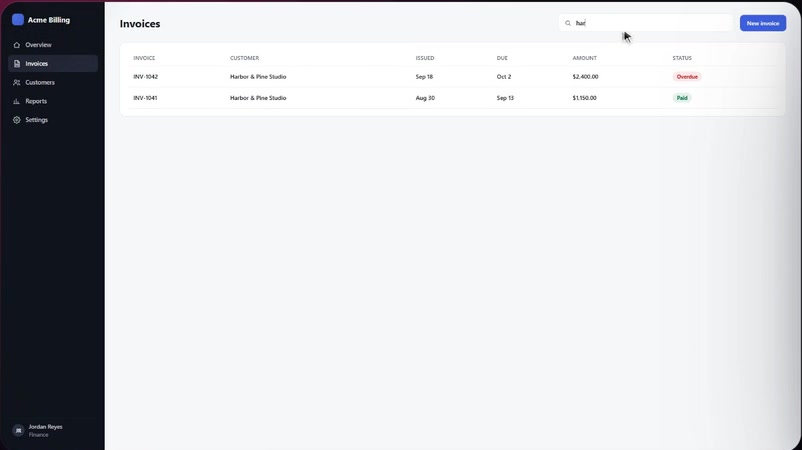
The raw screen recording, as recorded
As recordedThrough Girato
One frame from the same recording. Drag to compare. Nothing was edited by hand.
Privacy
  • Recordings never leave your machine.
  • No upload server to leak from.
Verifiable in the app
Auto-zoom
  • The camera follows your cursor.
  • It zooms into your clicks by itself.
  • No keyframes.
Verifiable in the app
Try it
  • Runs free in your browser.
  • No download, no account, no card.
  • 3 exports a month are badge-free.
Verifiable in the app
Pricing
  • $99 once for Lifetime.
  • Or stay on the free plan for good, with a small badge.
Verifiable in the app
Output
  • Real MP4 (H.264 + AAC) up to 4K.
  • X, LinkedIn and Instagram accept it as-is.
Verifiable in the app
Captions
  • Written on your computer by Whisper.
  • No cloud and no credits.
  • No per-minute fees.
Verifiable in the app
Stage
  • 26 backdrops and 4 aspect ratios.
  • Landscape to Reels from one recording.
  • No re-recording.
Verifiable in the app
Detail
  • Cursor smoothing and click spotlights.
  • Typing sounds driven by your real keystrokes.
Verifiable in the app
The fastest proof is your own screen.
  • Open Girato in your browser.
  • Record 20 seconds and watch it zoom.
  • No account, no card.
Try it now
Questions

Before you try it

Is Girato really free?
  • Yes. The full editor is free for good, with a small badge on exports.
  • Auto-zoom, captions and 1080p60 export are all included.
  • Each month, 3 exports of any length are badge-free.
  • Pro removes the badge and adds 4K: $8/month billed yearly, or $12 monthly.
  • Lifetime is $99 once.
Do my recordings get uploaded?
  • No. Girato records, edits, captions and exports on your own computer.
  • There is no upload step and no account.
  • The web version runs in your browser the same way.
Does it work on Windows?
  • Yes. Girato runs on Windows 10 and 11.
  • It runs on macOS too.
  • Or in Chrome or Edge, with nothing to install.
How is this different from Loom?
  • Loom is built for quick shared links through its cloud.
  • Girato is built for polished videos you own, with nothing uploaded.
  • You get automatic zooms, 3D framing, backdrops and real MP4 files.
How is this different from Screen Studio?
  • Screen Studio is Mac-only.
  • Girato has the same automatic zoom style on Windows, Mac and the web.
  • Girato also offers a one-time $99 Lifetime plan.
Can I get my money back?
  • Yes. Your first Pro purchase has a 14-day money-back guarantee.
  • That is on top of your statutory rights.
  • Try the free plan first, no card needed.

Your product is good. Your demo should look it.

  • Free in your browser.
  • Your first recording in a minute, zooms already in.
Start freeGet the apps